Disciple.Tools User Documentation
Accessing the Workflows Page
The Workflows page is part of Disciple.Tools Settings. You need permission to access Settings (D.T) to see and use Workflows.
From the Disciple.Tools Frontend
- Log in to your Disciple.Tools site with an account that has administration access.
- Open the WordPress Admin dashboard:
- On desktop: click the settings icon (⚙️) and select Admin.
- On mobile: tap the menu icon (☰) and select Admin.
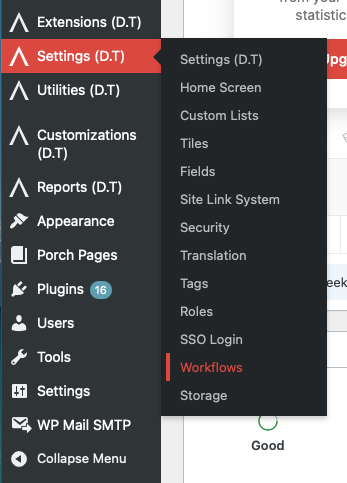
- In the main left sidebar, click Settings (D.T).
- Click the Workflows tab.
From the WordPress Admin Directly
- Log in to your site at the WordPress Admin URL (often
/wp-admin/). - In the left sidebar, click Settings (D.T).
- Click the Workflows tab.
The Workflows page URL includes page=dt_options and tab=workflows. If you have a direct link to Settings (D.T), you can add &tab=workflows to open Workflows.
Who Can Access Workflows?
Only users with permission to manage Disciple.Tools settings can open the Workflows page. If you do not see Settings (D.T) or the Workflows tab in the sidebar, your role does not have access. Ask your site administrator to adjust your permissions if you need to manage workflows.